Technology Today

Friday, March 16, 2007

KABUL EXPRESS DVD


this is a high quality rip in RMVB-size 302 MB(238 MB+64 MB)

Part 1: http://www.sendspace.com/file/r1c2wc

Part 2: http://www.sendspace.com/file/nva8wa


HONEYMOON TRAVELS PVT LTD DVD


http://rapidshare.com/files/19920190/Honeyroom_Travels_Private_Limited_-_1.wmv
http://rapidshare.com/files/19930493/Honeyroom_Travels_Private_Limited_-_2.wmv

Saturday, November 18, 2006

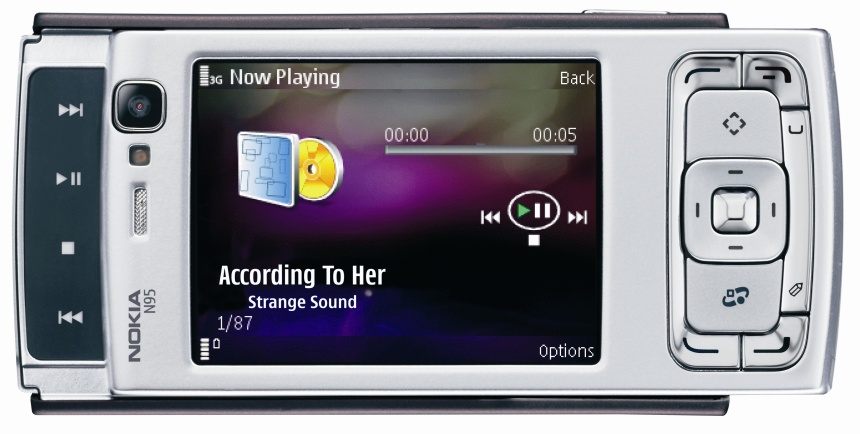
Nokia N95 Officially Confirmed By Nokia


"The Nokia N95 brings a range of multimedia ingredients together, such as a fantastic display, outstanding photo and video capability and high-speed connectivity, making it the ultimate multimedia computer," said Anssi Vanjoki, Executive Vice President, Multimedia, Nokia. "This single device - which fits easily in your pocket - can replace stand-alone devices that you no longer need, whether it's your music player, your digital camera, PDA or navigation device. Most importantly, the Nokia N95 is with you and connected when you want to use it."
The innovative 2-way slide concept makes it easy to switch between different modes, going from reading maps to watching a video with a simple slide. A numeric keypad slides out from one end of the device while dedicated media keys slide out from the opposite direction, converting the display into full screen landscape mode. With powerful 3D graphics, the Nokia N95 has a stunning user interface that makes it intuitive to find the features and services you want.


With its integrated GPS at your fingertips, finding your way just got easier. The Maps application includes maps for more than 100 countries, enabling users to explore the world, find specific routes or locate services such as restaurants and hotels and covering more than 15 million points of interest. You can also purchase additional features, such as city guides and voice guided navigation.
With the Carl Zeiss optics on the 5 megapixel camera, you can capture print quality photos and DVD-like quality video clips. Photos and video clips can be enjoyed on a compatible television thanks to the device's TV out feature and support for Universal Plug and Play (UPnP) technology.
Designed for High Speed Downlink Packet Access (HSDPA) networks and with support for WLAN, EDGE and WCDMA networks, the Nokia N95 provides excellent coverage and speeds wherever you may be. In HSDPA networks, browsing the internet, reading email, streaming video and downloading large files can be carried out up to 10 times faster than with 3G.


The Nokia N95 also offers a first class entertainment experience with the combination of a large 2.6" QVGA 16 million color display, impressive 3D graphics, built-in stereo speakers offering a 3D stereo effect, standard 3.5 mm audio jack, support for compatible microSD cards and mini USB for convenient data transfer. Browsing the internet on the Nokia N95 is a pleasure using the Nokia Web Browser with Mini Map, with new features such as a floating toolbar, password manager and auto complete, as well as web feeds with support for Atom and auto update.

The Nokia N95 is based on the world's leading S60 software on Symbian OS, enabling you to personalize your device from a wide choice of compatible applications that can be downloaded to the Nokia N95, including games, navigation, entertainment, productivity and creativity. The Nokia N95 comes out of the box ready to create, connect, consume and interact with some of the internet's most popular services. Use Yahoo! Search to search for and find most anything on the web, scroll though a book with Amazon's MobiPocket Reader or snap a photo and send it directly to your Flickr site.
The Nokia N95 is expected to start shipping in volumes during the first quarter of 2007 at an estimated unsubsidized retail price of 550 euros.


Nokia's Multimedia Computer(Supposedly N97)


The supposed specs on Nokia's upcoming N97, include a 20GB HDD, "3D stereo speakers" 5-megapixel camera with 20x zoom, 15fps video recording, a 3-inch screen, FM radio, miniSD, 400+ hour standby time, 4+ hour talk time and 24+ hour music playback.
I think it just misses some gaming power and graphics cards and a high speed internet connection.If it could get all those may be it can let you quit your computer .

Hope Nokia makes a confirmation soon .

Thursday, November 09, 2006

Disable XP Load Screen:


By disabling the load screen you can boost the boot up time by a couple of seconds, if not more. To disable the load screen, open the “msconfig” utility: go to Start>Run, type in “msconfig” without quotes and press Enter. In the subsequent window, select the ‘boot.ini’ tab. Check the /NOGUIBOOT option and press ‘Apply’. Restart Windows to see the effect.

Removing the Recycle Bin from the Desktop:

If you don't use the Recycle Bin to store deleted files , you can get rid of its desktop icon all together. Run Regedit and go to:

HKEY_LOCAL_MACHINE/SOFTWARE/Microsoft/Windows/CurrentVersion/explorer/Desktop/NameSpace

Click on the "Recycle Bin" string in the right hand pane. Hit Delete, click OK.

Creating Shutdown Icon or One Click Shutdown:

Navigate to your desktop. On the desktop, right-click and go to New, then to Shortcut (in other words, create a new shortcut). You should now see a pop-up window instructing you to enter a command line path.

Use this path in "Type Location of the Item"
SHUTDOWN -s -t 01

If the C: drive is not your local hard drive, then replace "C" with the correct letter of the hard drive. Click the "Next" button. Name the shortcut and click the "Finish" button. Now whenever you want to shut down, just click on this shortcut and you're done.

Renaming The Recycle Bin icon:

To change the name of the Recycle Bin desktop icon, click Start then goto Run, write Regedit and press Enter. It opens Registry Editor. Now in Registry Editor go to:

HKEY_CLASSES_ROOT/CLSID/{645FF040-5081-101B-9F08-00AA002F954E}

and change the name "Recycle Bin" to whatever you want (don't type any quotes).

Use the shutdown command. These are its parameters

Type these commands in RUN
shutdown -l : Logs off the current user
shutdown -s : Shuts down the PC.
shutdown -r : Restart
shutdown -a : Cancel Shutdown in progress
shutdown -f : Forces applications to close and then shutdown.
shutdown -m \\ComputerName : Remotely shutdown a PC
shutdown -t xx : Shutdown the pc in xx seconds
shutdown -c "message" : Displays a message during shutdown
at xx:xx shutdown -s: shuts down PC in specified time (time should be specified in 24 hr format for instant 21:30 shuts down at 9:30 pm).

Wednesday, November 08, 2006

Increase 20% of broadband connection (Essential)

Microsoft reserve 20% of your available bandwidth for their own purposes(suspect for updates and interrogating your machine etc..)Here's how to get it back:Click Start-->Run-->type "gpedit.msc" without the ""This opens the group policy editor.
Then go to: Local Computer Policy-->Computer Configuration-->Administrative Templates-->Network-->QOS Packet Scheduler-->Limit Reservable Bandwidth, Double click on Limit Reservable bandwidth. It will say it is not configured, but the truth is under the 'Explain' tab :"By default, the Packet Scheduler limits the system to 20 percent of the bandwidth of a connection, but you can use this setting to override the default."So the trick is to ENABLE reservable bandwidth, then set it to ZERO. This will allow the system to reserve nothing, rather than the default 20%.Works on XP Pro and 2000.

Type in Indian languages very easily
Has it often happened that you want to type some text in Hindi,Telugu, Tamil, Kannada or Malayalam but you cant because you dont have a software to do that.Well here is a free service,you dont have to download any software for this,just go to http://www.quillpad.com/On this web page type your text in English and you will get it in one of the above languages simulataneously as you write.for exampleIf you type: Kaise ho aap Kya kar rahe ho Aap kab vapas aaogeYou get: कैसे हो आप क्या कर रहे हो आप कब वापस आओगYou can get it in Telugu, Tamil, Kannada or Malayalam too.If you like it please comment.
or else
go to Start>All Programs>Accessories>System tools>Character map
in that select different fonts to write in indian languages.